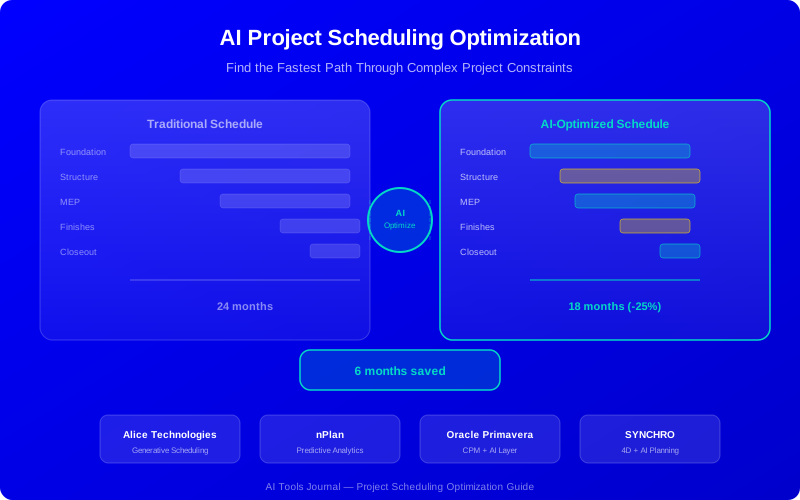
AI Project Scheduling Optimization: Cut Timelines by 25% or More
AI scheduling tools analyze millions of task sequences to find the fastest project path. This guide covers the top platforms, how generative scheduling works, and practical implementation steps.
AI scheduling generates and evaluates thousands of possible schedules to find the optimal sequence.
Firms using AI scheduling report 15-30% shorter project timelines on average.
Alice Technologies and nPlan lead the market in AI schedule optimization.
AI considers constraints humans can't process simultaneously: labor, equipment, weather, space, and materials.
Start with a mid-complexity project and run AI alongside your traditional schedule for comparison.
Your project scheduler just spent two weeks building a CPM schedule. It looks reasonable. But is it the best schedule? Almost certainly not. A human can evaluate maybe a dozen scheduling options. AI evaluates millions.
AI scheduling optimization generates and tests thousands of possible schedules, factoring in constraints that no human can process simultaneously. The result: projects that finish 15-30% faster with the same resources.
How AI Schedule Optimization Works
Traditional scheduling is essentially constraint entry. You define tasks, durations, and dependencies. The CPM algorithm calculates the critical path. AI scheduling is fundamentally different—it's constraint optimization.
The AI Scheduling Process
Input your WBS and constraints: Tasks, dependencies, resource limits, space restrictions, weather windows, and delivery dates
AI generates scenarios: The algorithm creates thousands of valid schedule permutations that satisfy all constraints
Multi-objective optimization: AI evaluates each scenario against your goals—shortest duration, lowest cost, most balanced resource usage, or a weighted combination
Risk adjustment: AI applies duration uncertainty from historical data to identify high-variance activities and place buffers intelligently
Output ranked options: You receive 3-5 optimized schedules with trade-off analysis, not just one answer
Traditional CPM gives you a good schedule. AI scheduling gives you the best possible schedule from thousands of options.
Top AI Scheduling Platforms
1. Alice Technologies
Alice Technologies is the most advanced AI scheduling platform. Its generative scheduling engine doesn't just analyze your schedule—it creates entirely new ones.
Key capabilities:
Generative scheduling that creates optimal schedules from your WBS and constraints
What-if analysis: "What happens if steel delivery is 3 weeks late?" answered in seconds
Resource-constrained scheduling across labor trades, equipment, and spatial zones
Automatic schedule recovery when projects fall behind
Integration with Primavera P6 and Microsoft Project
Results: Clients report 15-25% schedule compression on complex projects. One infrastructure client reduced a 24-month timeline to 19 months using Alice.
Best for: Complex projects with $50M+ budgets and multiple resource constraints.
2. nPlan
nPlan takes a different approach: predictive scheduling. It's trained on 600,000+ construction projects and predicts how long activities will actually take—not how long you estimated.
Key capabilities:
Duration predictions with probability distributions (not single-point estimates)
Schedule risk analysis showing which activities are most likely to delay the project
Buffer optimization that places contingency where it matters most
Benchmark comparison against similar completed projects
Results: nPlan predictions are within 5% of actual durations 80% of the time. Early users caught potential delays 3-4 weeks sooner.
Best for: Owners, developers, and contractors who want data-driven schedule risk assessment.
3. Oracle Primavera AI
Oracle added AI capabilities to Primavera P6—the industry-standard scheduling tool. If your team already uses P6, the AI features are a natural extension.
Key capabilities:
AI-powered resource leveling that minimizes cost while meeting deadlines
Predictive delay detection based on progress data patterns
Automated schedule health scoring and recommendations
Scenario comparison for multiple schedule alternatives
Best for: Organizations already using Primavera P6 for enterprise project scheduling.
4. SYNCHRO by Bentley Systems
SYNCHRO combines 4D scheduling (3D model + time) with AI optimization. It's particularly strong for projects using digital twins.
Best for: Infrastructure projects with strong BIM/digital twin workflows.
Platform Comparison
Platform
Approach
Data Required
Best Project Size
Integration
Alice Technologies
Generative
WBS + constraints
$50M+
P6, MS Project
nPlan
Predictive
Historical schedules
$10M+
P6, Asta, Excel
Oracle Primavera AI
Optimization
P6 schedule
$25M+
Native P6
SYNCHRO
4D + AI
BIM model + schedule
$20M+
Bentley, IFC
Constraints AI Handles Simultaneously
Human schedulers typically consider 3-5 constraints when building a schedule. AI handles dozens simultaneously:
Labor availability: Which trades are available when, including overtime limits and certification requirements
Equipment constraints: Crane locations, tower crane reach, equipment mobilization windows
Spatial conflicts: Which zones can have work in them simultaneously without safety or logistics conflicts
Weather windows: AI incorporates historical weather data to schedule weather-sensitive activities optimally
Material deliveries: Lead times, storage constraints, and just-in-time delivery optimization
Permit windows: Activities that can only happen within specific permit approval windows
Noise/vibration limits: Restrictions on certain activities near hospitals, schools, or residential areas
Cash flow: Scheduling that optimizes payment milestones and cash flow requirements
The magic happens when AI optimizes across all these constraints simultaneously. A human might optimize for labor, then adjust for equipment, then check weather—each adjustment compromises the previous optimization. AI finds the globally optimal solution in one pass.
Real-World Results
Highway Interchange Project
A $120M highway interchange used Alice Technologies to optimize the construction sequence. AI found a schedule 22% shorter than the contractor's original plan by rearranging earthwork and structural sequences that human schedulers hadn't considered.
Hospital Construction
A 450-bed hospital project used nPlan for schedule risk analysis. The AI identified that mechanical system installation had a 73% probability of exceeding the estimated duration. The team added resources proactively and met the original deadline—instead of discovering the delay mid-construction.
Data Center Campus
A $200M data center campus ran Alice for what-if analysis when supply chain delays hit steel delivery. AI generated 5 alternative schedules in 20 minutes. The team picked a sequence that kept the project on track by reordering concrete and electrical work—an option they wouldn't have found manually.
Start small with a single project pilot. Validate the AI against actual results before scaling across your portfolio.
Implementation Tips
Choosing Your Pilot Project
Pick a project that's complex enough to benefit from AI but not so critical that any issues cause major problems. Ideal characteristics:
Duration of 12-24 months
Budget of $20M-100M
Multiple trades and resource constraints
A scheduler willing to work with AI-generated alternatives
Preparing Your Data
For generative scheduling (Alice), you need a well-structured WBS with clear constraints. For predictive scheduling (nPlan), you need historical schedule data from similar projects. Clean your data before import—garbage in, garbage out applies to AI scheduling too.
Managing the Change
The biggest challenge isn't technical—it's human. Experienced schedulers may resist AI suggestions. Frame AI as a tool that enhances their expertise, not replaces it. Show them specific examples where AI found solutions they wouldn't have considered.
No. AI generates optimized schedules, but experienced schedulers review, adjust, and approve them. AI handles the computational heavy lifting—testing millions of sequences—while humans apply judgment about site conditions, stakeholder relationships, and practical constraints that AI can't fully model.