AI Stack Trace Analyzer: Read Crash Reports Like a Pro
Turn confusing stack traces into clear answers. AI stack trace analyzers pinpoint the root cause of crashes instantly. Compare the best tools for 2026.
AI stack trace analyzers identify root causes in seconds, even in traces with 50+ frames.
The best tools follow the data flow backward to find where things actually broke—not just where the crash happened.
GitHub Copilot Chat and Cursor are best for IDE-based analysis. Sentry AI excels for production traces.
Multi-service traces across microservices are where AI provides the biggest time savings.
Always share the full stack trace—truncated traces give AI incomplete information.
A 47-frame stack trace just landed in your terminal. Somewhere in those nested function calls, something broke. Finding the actual root cause could take minutes or hours of scrolling, reading, and guessing.
AI stack trace analyzers cut through the noise. They read the entire trace, follow the call chain, identify the most relevant frame, and explain the root cause in plain English. This guide shows you the best tools and how to use them.
Why Stack Traces Are Hard to Read
Stack traces are supposed to help, but they often confuse more than they clarify. Here's why:
ADVERTISEMENT
Too many frames: Most stack traces include framework internals you don't need to see
Wrong frame highlighted: The top frame shows where the crash happened, but the real bug is often 5-10 frames deeper
Missing context: Traces show the call chain but not the data that caused the crash
Cross-file dependencies: The bug might start in one file, pass through three others, and crash in a fifth
Async complexity: Async stack traces in JavaScript and Python can be fragmented and hard to follow
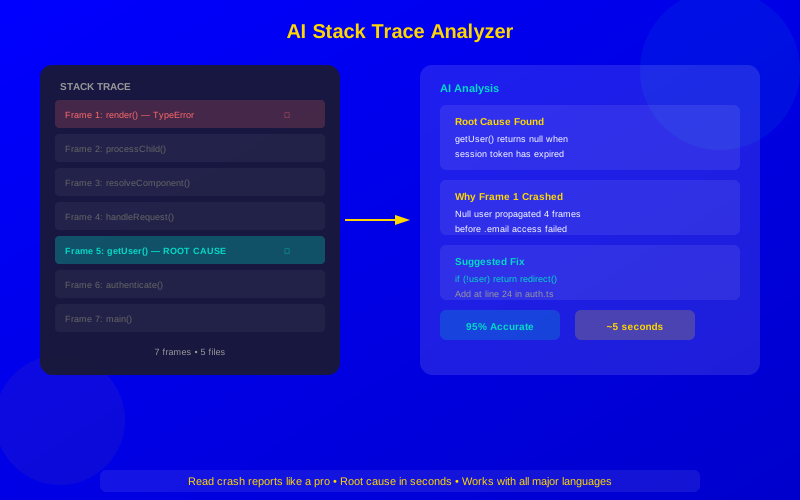
AI identifies the root cause frame (Frame 5) even though the crash shows at Frame 1
Experienced developers learn to skip framework frames and focus on their own code. AI does this automatically—and faster.
"Junior developers stare at the top of the stack trace. Senior developers scan for their own code. AI reads the entire trace and gives you both the cause and the fix."
ADVERTISEMENT
— Kelsey Hightower, Developer Advocate
Best AI Stack Trace Analyzers Compared
Tool
Best For
Multi-Service Traces
Real-Time Analysis
Price
GitHub Copilot Chat
IDE-based trace analysis
Limited
Yes (IDE)
$10-19/mo
Cursor
Complex multi-file traces
Limited
Yes (IDE)
$20/mo
Sentry AI
Production crash analysis
Excellent
Yes (production)
$26-80/mo
Datadog AI
Distributed system traces
Excellent
Yes (production)
Custom pricing
Amazon Q Developer
AWS service traces
AWS services
Yes (IDE)
Free-$19/mo
ChatGPT
Quick paste-and-analyze
Basic
No
Free-$20/mo
IDE-Based Stack Trace Analysis
For most developers, IDE-based analysis is the fastest workflow. You see a crash, you analyze it—all without leaving your editor.
GitHub Copilot Chat
Copilot Chat excels at analyzing stack traces within your project context. It reads the trace, finds the relevant source files in your repo, and explains the root cause.
ADVERTISEMENT
How to use it effectively:
Copy the full stack trace from your terminal
Open Copilot Chat (Ctrl+Shift+I in VS Code)
Paste the trace with the prompt: "Analyze this stack trace and find the root cause"
Copilot identifies the relevant frame, opens the source file, and suggests a fix
Cursor
Cursor takes analysis further by automatically reading all files referenced in the stack trace. If the trace passes through five of your files, Cursor reads all five and traces the data flow. This makes it the best choice for complex crashes.
ADVERTISEMENT
Its Composer feature can even generate a complete fix across multiple files based on trace analysis.
Production Stack Trace Analysis
IDE tools work great for development. But production crashes need specialized tools that monitor your running application.
ADVERTISEMENT
Sentry AI
Sentry is the gold standard for production error tracking. Its AI features take this further:
Automatic grouping: AI clusters similar crashes into issues, even if stack traces differ slightly
Root cause analysis: AI identifies the most likely cause and affected code
Impact scoring: AI predicts which crashes affect the most users
Fix suggestions: AI generates patches based on the error pattern
Regression detection: AI spots when a fixed bug reappears
Sentry's stack trace analysis works across JavaScript, Python, Java, Ruby, PHP, Go, Rust, and most other popular languages.
ADVERTISEMENT
Datadog AI
For teams running microservices, Datadog connects traces across services. When a request fails after passing through 5 microservices, Datadog's AI shows you exactly which service caused the failure and why.
Key features:
ADVERTISEMENT
Distributed tracing: Follow a request across every service it touches
Anomaly detection: AI spots unusual patterns in trace data
Performance correlation: Links slow traces to resource constraints
Error classification: Auto-categorizes errors by type and severity
AI Analysis Techniques for Different Trace Types
Different trace types need different approaches. Here's how to get the best results:
Synchronous Traces (Java, Python, C#)
These are the easiest for AI. The call chain is linear and complete. Paste the full trace, and AI can follow the chain from entry point to crash.
ADVERTISEMENT
Pro tip: Include the exception type and message along with the trace. "NullPointerException at line 42" plus the trace gives AI everything it needs.
Async Traces (JavaScript, Python asyncio)
Async traces are tricky because the call chain is fragmented. Callbacks and promises break the trail. AI handles this by:
ADVERTISEMENT
Reconstructing the logical flow from multiple trace fragments
Following promise chains and async/await patterns
Identifying where the async context was lost
Tip: In Node.js, enable --async-stack-traces for more complete async traces.
Multi-Service Traces
When a crash involves multiple microservices, provide traces from all involved services. AI works best with the complete picture. Include:
ADVERTISEMENT
The request ID or correlation ID
Stack traces from each service in the request path
HTTP status codes and response bodies
Timestamps to establish sequence
AI achieves highest accuracy on synchronous traces; async and multi-service traces benefit from extra context
Advanced Stack Trace Analysis Techniques
Get more from AI trace analysis with these advanced approaches:
Pattern Matching Across Traces
If you have multiple traces from the same crash, feed them all to AI. It can identify the common pattern:
ADVERTISEMENT
"Here are 5 stack traces from the same crash. What do they have in common?"
AI identifies the shared frames and narrows the root cause
Before/After Comparison
When a bug appears after a deployment:
Get a stack trace from the failing version
Get the relevant code diff from the deployment
Ask AI: "This trace started appearing after this code change. What in the diff caused it?"
Memory and Performance Traces
For memory leaks and performance issues, stack traces from profiling tools contain valuable information. Feed heap snapshots or CPU profiles to AI for analysis.
ADVERTISEMENT
Real-World Stack Trace Analysis Examples
Example 1: The Invisible Null
A Node.js app crashes with "TypeError: Cannot read properties of null (reading 'email')." The stack trace points to a template rendering function. But AI identifies the real cause: a database query 4 frames deeper returns null when a user account is deactivated. The fix: add a null check after the query, not at the template level.
Example 2: The Race Condition
A Java service intermittently throws ConcurrentModificationException. The trace points to an ArrayList.add() call. AI recognizes the pattern: multiple threads access a shared list without synchronization. The fix: switch to CopyOnWriteArrayList or add synchronized blocks.
ADVERTISEMENT
Example 3: The Distributed Timeout
A microservice returns 504 Gateway Timeout. The trace shows the request reached the API gateway but timed out waiting for the downstream service. AI analyzes traces from both services and identifies that the database connection pool in the downstream service is exhausted. The fix: increase pool size and add connection timeout handling.
Best Practices for AI Trace Analysis
Do
Don't
Paste the full stack trace
Truncate to just the error line
Include the error message and type
Paste only the stack frames
Mention your runtime version
Assume AI knows your environment
Provide recent code changes
Omit deployment context
Share traces from all involved services
Send only one service's trace
Verify AI's suggested fix before applying
Blindly apply the first suggestion
Getting Started
Ready to let AI read your stack traces? Here's your plan:
ADVERTISEMENT
Today: Next time you see a stack trace, paste it into Copilot Chat or ChatGPT before reading it yourself
Compare: See if AI finds the root cause faster than you would have
For production: Set up Sentry's free tier to get AI analysis of production crashes
For teams: Share effective trace analysis prompts across your team
stack traceAI debuggingcrash analysiserror diagnosisdebugging toolsdeveloper productivityroot cause analysis
Frequently Asked Questions
Yes, all major AI tools understand stack traces from Python, JavaScript, Java, C#, Go, Rust, C++, Ruby, and PHP. The analysis quality is best for Python and JavaScript because these have the most training data. Even for less common languages, AI can identify common crash patterns.