Complete Generative AI Guide: Everything You Need to Know (2026)
Master generative AI in 2026. This guide covers ChatGPT 5, Claude 3, Gemini Ultra, image generators, video AI, music AI, and how to use them all effectively.
Generative AI in 2026 creates text, images, video, music, and code from simple prompts.
ChatGPT 5, Claude 3, and Gemini Ultra lead the text generation space with distinct strengths.
AI image generators now produce photorealistic output with reliable text rendering.
AI video generation has reached production quality for short-form content.
The best results come from learning prompt engineering and understanding model strengths.
Always fact-check AI output—generative AI can produce confident but wrong information.
Generative AI has become the most transformative technology of the decade. In 2026, these tools create text, images, video, music, and code that rival human output. Millions of people use them daily for work, creativity, and learning.
This guide covers everything you need to know about generative AI in 2026: the leading tools, how they work, what they're best at, and how to use them effectively. Whether you're a complete beginner or an experienced user, you'll find actionable insights here.
What This Guide Covers:
How generative AI works (explained simply)
The complete landscape of 2026 generative AI tools
Text generation: ChatGPT 5, Claude 3, Gemini Ultra
AI image generation tools and techniques
AI video and music generation platforms
Prompt engineering best practices
Limitations, risks, and ethical considerations
How Generative AI Works
Generative AI learns patterns from massive amounts of data. Then it uses those patterns to create new content that follows the same rules. It doesn't copy existing content—it generates something new based on what it has learned.
The Simple Explanation
Think of it like this: if you read thousands of recipes, you'd eventually understand how recipes work. You could write a new recipe for "spicy chocolate cake" without copying any specific recipe. Generative AI does the same thing, but with billions of examples and much faster processing.
Key Concepts You Should Know
Concept
What It Means
Why It Matters
Large Language Model (LLM)
AI trained on massive text data to understand and generate language
Powers ChatGPT, Claude, Gemini
Prompt
The instruction you give the AI
Better prompts = better results
Token
A piece of text (roughly ¾ of a word)
Determines input/output limits
Context Window
How much text the AI can "remember" in a conversation
Larger = better for long tasks
Hallucination
When AI confidently states something incorrect
Always verify important facts
Fine-tuning
Training a model on specialized data
Creates tools for specific industries
Multimodal
AI that handles text, images, audio, and video
The direction all major models are heading
Text Generation: The Big Three in 2026
Three platforms dominate text generation in 2026: ChatGPT 5 (OpenAI), Claude 3 (Anthropic), and Gemini Ultra (Google). Each has distinct strengths.
Quick Comparison
Feature
ChatGPT 5
Claude 3
Gemini Ultra
Company
OpenAI
Anthropic
Google
Best For
General tasks, coding, plugins
Long writing, analysis, safety
Research, Google integration
Context Window
128K tokens
200K tokens
1M+ tokens
Free Tier
Yes (GPT-4o)
Yes (limited)
Yes (with Google account)
Paid Price
$20/month
$20/month
$20/month (Google One AI)
Multimodal
Text, image, audio, video
Text, image, PDF
Text, image, audio, video
Plugins/Tools
Extensive ecosystem
Growing
Deep Google integration
Code Generation
Excellent
Excellent
Very good
The Big Three AI text generators compared — each excels in different areas while sharing identical pricing
ChatGPT 5: The All-Rounder
ChatGPT 5 from OpenAI remains the most popular generative AI tool. With over 200 million weekly active users, it has the largest ecosystem of plugins, integrations, and community resources.
Versatility: Handles writing, coding, analysis, math, and creative tasks equally well
Plugin ecosystem: Connects to hundreds of third-party tools and services
Custom GPTs: Build specialized AI assistants for specific tasks
Voice mode: Natural conversation with real-time voice interaction
Image generation: Built-in DALL-E integration for creating images
Memory: Remembers your preferences across conversations
"ChatGPT 5 is the Swiss Army knife of AI. It's not always the absolute best at any single task, but it's remarkably good at everything. For most people, it's the only AI tool they need."
— Ben Thompson, Stratechery
Claude 3: The Writer's Choice
Claude 3 from Anthropic has earned a reputation for producing the highest quality long-form writing. Its 200K token context window means it can work with entire books at once.
Claude 3's strengths include:
Long-form writing: Produces more natural, less repetitive text for articles and reports
Document analysis: Upload PDFs, spreadsheets, and codebases for instant analysis
200K context: Work with documents up to 500 pages without losing context
Safety focus: Designed to be helpful while avoiding harmful outputs
Coding excellence: Among the best for code generation and debugging
Honest uncertainty: More likely to say "I don't know" than make something up
Gemini Ultra: The Research Powerhouse
Gemini Ultra from Google leverages its unique position: direct access to Google Search, YouTube, Maps, Gmail, and the entire Google ecosystem.
Gemini Ultra's strengths include:
Google integration: Search the web, access Gmail, work with Drive files directly
1M+ token context: The largest context window of any consumer AI tool
Multimodal native: Built from the ground up to understand text, images, audio, and video
Research capabilities: Generates cited responses with links to sources
Real-time information: Access to current data through Google Search integration
AI Image Generation in 2026
AI image generation has reached a milestone in 2026: photorealistic output that's nearly impossible to distinguish from photographs. The tools also finally handle text in images reliably.
Getting great results from image generators requires good prompting:
Be specific about style: "Watercolor painting" or "professional product photo" gets better results than vague descriptions
Include lighting details: "Soft natural light" or "dramatic studio lighting" dramatically affects output
Specify composition: "Close-up portrait" or "wide landscape shot" helps frame the image
Use negative prompts: Tell the AI what you don't want to avoid common issues
Iterate: Generate multiple versions and refine your prompt based on results
AI Video Generation
AI video generation made a massive leap in 2025-2026. Short-form video (under 60 seconds) is now production-ready for social media, marketing, and education.
Top AI Video Tools
Tool
Best For
Max Length
Quality
Price
OpenAI Sora
Cinematic short videos
60 seconds
Excellent
Included with ChatGPT Pro
Runway Gen-3
Creative control
16 seconds
Excellent
$12-76/mo
Google Veo 2
Realistic footage
30 seconds
Excellent
Via Google AI Studio
Pika Labs
Quick social content
15 seconds
Very good
Free-$58/mo
Synthesia
Talking head videos
Unlimited
Very good
$22-67/mo
Current Limitations
AI video generation is impressive but has clear limits in 2026:
Consistency: Characters may change appearance between clips
Physics: Complex physical interactions still look unnatural
Hands and text: Better than before but still occasionally incorrect
Audio: Most tools generate silent video—you add audio separately
AI Music Generation
AI music tools now create radio-quality songs, background music, and sound effects from text descriptions. This has transformed content creation for podcasters, video makers, and independent creators.
The difference between mediocre and excellent AI output is often the prompt. Here are proven techniques:
Core Prompt Engineering Principles
Be specific: "Write a 500-word blog post about AI in healthcare for hospital administrators" beats "Write about AI in healthcare"
Set the role: "You are an experienced marketing copywriter" gives the AI context for tone and style
Provide examples: Show the AI what you want by including a sample of your preferred output format
Break complex tasks: Instead of one giant prompt, break work into steps and iterate
Specify format: "Use bullet points," "Create a table," or "Write in paragraphs of 2-3 sentences"
Prompt Templates That Work
Here are tested prompt structures for common tasks:
Task
Prompt Structure
Writing
"Write a [format] about [topic] for [audience]. Use [tone]. Include [specific elements]. Keep it under [length]."
Analysis
"Analyze [this text/data]. Focus on [specific aspects]. Present findings as [format]. Note any limitations."
Coding
"Write [language] code that [does what]. Use [framework/library]. Include error handling and comments."
Summarizing
"Summarize [this content] in [number] bullet points. Focus on [key aspects]. Keep each point under [length]."
Creative
"Create [type of content] in the style of [reference]. The mood should be [description]. Include [specific elements]."
"Prompt engineering is the new literacy. The people who get the best results from AI aren't necessarily the smartest—they're the ones who communicate most clearly with the machine."
— Ethan Mollick, Wharton School of Business
Limitations, Risks, and Ethics
Generative AI is powerful but not perfect. Understanding its limitations protects you from mistakes and misuse.
Known Limitations
Hallucinations: AI can generate false information with complete confidence. Always verify facts.
Bias: AI reflects biases from its training data. Be aware of this in hiring, healthcare, and legal contexts.
Knowledge cutoff: Models have training data cutoff dates. They may not know about very recent events.
Lack of true understanding: AI processes patterns, not meaning. It can produce text that sounds intelligent but contains logical errors.
Copyright uncertainty: The legal status of AI-generated content varies by jurisdiction and continues to evolve.
Best Practices for Responsible Use
Verify important facts: Never publish AI-generated claims without checking them
Disclose AI use: Be transparent when significant content is AI-generated
Protect privacy: Don't paste sensitive personal data into AI tools
Add human value: Use AI as a starting point, then add your expertise and judgment
Stay informed: AI capabilities and regulations change rapidly—keep learning
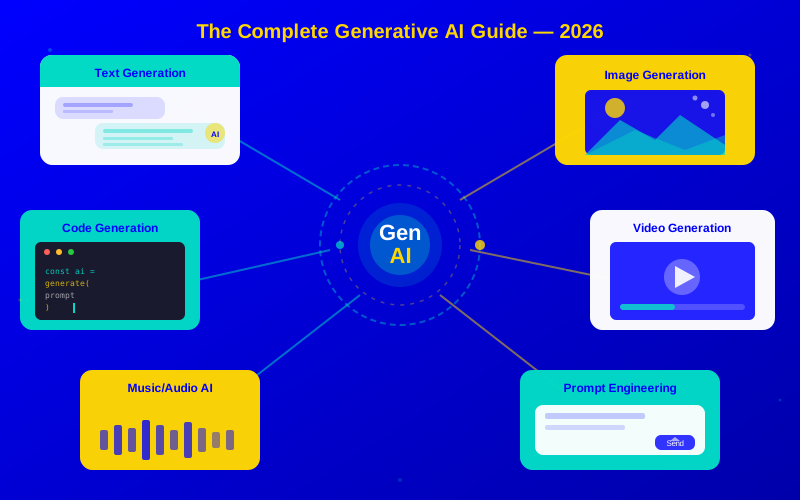
The generative AI landscape in 2026 spans six major content categories, each with mature, production-ready tools
Getting Started Today
Ready to start using generative AI? Here's your action plan:
Try 5-10 different tasks: writing, summarizing, coding, brainstorming, and analyzing
Experiment with different prompting styles to see what works
Week 2: Try Image Generation
Use DALL-E within ChatGPT or try Midjourney or Ideogram
Generate images for social media, presentations, or creative projects
Practice writing detailed image prompts
Week 3: Apply to Your Work
Identify 3 tasks in your daily work where AI could save time
Use AI to draft emails, reports, or content you'd normally write from scratch
Measure the time saved and quality difference
Week 4: Go Deeper
Try Claude for longer writing projects
Experiment with Gemini's Google integrations
Explore specialized tools for your industry or profession
Conclusion
Generative AI in 2026 is mature, powerful, and accessible. The tools are good enough to meaningfully improve your productivity, creativity, and learning—but they require human direction, oversight, and judgment to produce their best work.
Start simple. Learn prompt engineering. Understand the limitations. If you want a deeper look at the most popular tool on this list, our ChatGPT 5 Features Guide walks through every feature in detail. Brand new to AI? Our ChatGPT Go: Getting Started Guide takes you from zero to productive in under an hour.
For specific use cases, explore how teachers and students are using these tools in our Generative AI in Education guide. If you're creating content with AI, our breakdown of AI Written Content explains how to keep quality high. And to see how AI is transforming how we find information, check out AI Search Tools.
The future belongs to people who learn to collaborate effectively with AI. That journey starts with your first prompt.
Generative AI is artificial intelligence that creates new content. You give it a description (called a prompt), and it generates text, images, video, code, or music that didn't exist before. Think of it like a very smart assistant that can write, draw, compose, and code based on your instructions.