The Ultimate Guide to AI in Special Education (2026)
Discover how AI transforms special education in 2026. This guide covers IEP tools, speech therapy assistants, autism support, dyslexia reading aids, and more.
AI tools for special education save teachers 5-10 hours weekly on IEP paperwork.
Speech therapy AI assistants now deliver personalized practice at home and school.
AI reading tools for dyslexia adapt in real time to each student's reading level.
ADHD focus management apps use AI to build personalized attention-training routines.
AI-powered sensory processing tools help create calmer, more inclusive classrooms.
The best results come from combining AI tools with human teacher expertise.
AI is changing special education in powerful ways. In 2026, teachers have access to tools that write IEP goals, track student progress, adapt reading materials, support speech therapy, and help students with autism, ADHD, and sensory processing challenges.
This guide covers every major category of AI tools in special education. You'll learn what works, what to look for, and how to get started—whether you're a special education teacher, a general education teacher with inclusive classrooms, or a school administrator.
What This Guide Covers:
How AI is transforming special education in 2026
AI tools for IEP writing and compliance
Speech therapy AI assistants
AI support for autism spectrum students
Dyslexia and reading assistance tools
ADHD focus management solutions
Sensory processing support technology
How to choose and implement the right tools
The AI Special Education Landscape in 2026
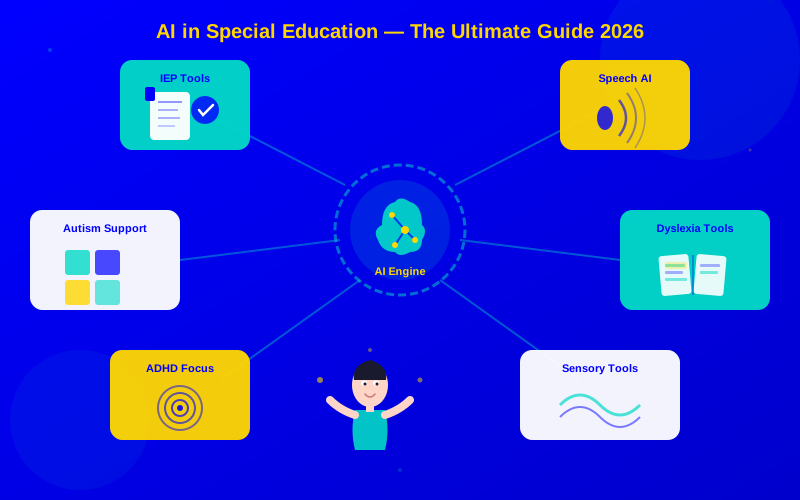
The six major categories of AI tools in special education, all connected through a central AI engine
Special education has always demanded more from teachers. More paperwork. More planning. More individualization. AI tools now handle much of this work, freeing teachers to focus on what matters most: their students.
According to the National Center for Education Statistics, 7.3 million students in the United States receive special education services. That's about 15% of all public school students. Each one needs an Individualized Education Program (IEP). Each IEP needs regular updates, progress reports, and compliance documentation.
AI doesn't replace the teacher's expertise. It handles the repetitive tasks so teachers can spend more time with students. Here's what the research shows:
Task
Time Without AI
Time With AI
Time Saved
Writing IEP goals
2-3 hours per student
30-45 minutes
60-75%
Progress monitoring reports
4-6 hours weekly
1-2 hours weekly
65-70%
Creating adapted materials
3-4 hours daily
45-60 minutes
70-80%
Parent communication
5-8 hours weekly
2-3 hours weekly
55-65%
Compliance documentation
6-10 hours monthly
2-3 hours monthly
65-75%
"AI hasn't replaced a single thing I do as a special education teacher. But it's given me back 8 hours a week. That's 8 more hours I spend actually teaching kids instead of typing into forms."
— Sarah Michaels, Special Education Teacher, Colorado
AI Tools for IEP Writing and Management
IEP paperwork is the biggest time drain for special education teachers. AI tools now draft goals, suggest accommodations, track progress, and flag compliance issues automatically.
Writing good IEP goals is hard. Goals must be specific, measurable, achievable, relevant, and time-bound (SMART). AI tools help by:
Suggesting goals from assessment data: Upload test results, and the AI recommends appropriate goals
Aligning to standards: Goals automatically connect to state learning standards
Tracking progress: AI monitors data points and alerts you when a student is falling behind
Flagging compliance gaps: The system checks your IEP against federal and state requirements
Generating progress reports: Turn raw data into parent-friendly narratives in seconds
The best IEP tools learn from your writing style. Over time, suggestions match your voice and your school's preferred language.
AI Speech Therapy Assistants
Speech-language pathologists (SLPs) serve large caseloads—often 50 to 80 students. AI speech therapy tools extend practice time beyond the therapy room, giving students more repetitions and faster progress.
How AI Speech Therapy Works
Modern AI speech therapy tools use voice recognition to listen to a student's speech, identify errors, and provide real-time feedback. Key capabilities include:
Articulation practice: AI detects specific sound errors (like /r/ or /s/) and guides correction
Fluency monitoring: Real-time tracking of stuttering patterns and providing pacing cues
Language modeling: AI presents sentence structures and vocabulary at the right level
Progress dashboards: SLPs see detailed data on student practice between sessions
Home practice assignments: Students practice with AI feedback at home, extending therapy
Top AI Speech Therapy Tools
Tool
Focus Area
Ages
Key Feature
Amira Learning
Reading fluency + oral language
K-5
AI listening assessment with real-time coaching
Speech Blubs
Articulation + vocabulary
1-8 years
Video modeling and voice recognition games
Articulation Station
Articulation drills
All ages
6,000+ practice words organized by sound
Constant Therapy
Language + cognitive skills
Teens/Adults
AI-adaptive difficulty for stroke/TBI recovery
LAMP Words for Life
AAC communication
All ages
Motor planning language system with AI prediction
"My students used to get 20 minutes of speech practice per week in sessions. Now with AI tools, they practice 10-15 minutes daily at home. The progress difference is remarkable."
— Dr. Elena Torres, Speech-Language Pathologist
AI Support for Autism Spectrum Students
Students on the autism spectrum face unique challenges in social communication, sensory processing, and routine management. AI tools help in ways that weren't possible even two years ago.
Social Skills and Communication
AI-powered social skills tools use interactive scenarios to teach students how to read social cues, manage conversations, and understand emotions:
Social story generators: AI creates personalized social stories for specific situations
Emotion recognition training: Apps that teach facial expression and tone of voice interpretation
Conversation simulators: Safe practice environments for social interactions
Visual schedule builders: AI creates and adjusts daily visual schedules based on student needs
Top AI Tools for Autism Support
Tool
Focus Area
Key Feature
Research Backed
Social Express
Social skills
Interactive video scenarios with branching
Yes
Proloquo2Go
AAC communication
AI-predicted symbol selection
Yes
Brain in Hand
Self-management
Anxiety tracking and coping strategy AI
Yes
Model Me Going Places
Community skills
Video modeling for real-world situations
Yes
CoughDrop
AAC communication
Open-source with AI learning
Yes
Behavior Tracking and Analysis
AI behavior tracking tools help teachers understand patterns behind challenging behaviors. Instead of guessing, teachers use data:
ABC data collection: AI records Antecedent-Behavior-Consequence patterns throughout the day
Intervention suggestions: Based on data patterns, AI recommends evidence-based strategies
Progress visualization: Clear charts showing behavior trends over weeks and months
AI Dyslexia and Reading Assistance Tools
An estimated 1 in 5 students has dyslexia. AI reading tools now detect reading difficulties earlier, provide adaptive text support, and deliver personalized phonics instruction.
Early Detection
AI can identify signs of dyslexia as early as kindergarten—years before traditional assessment. Early detection tools analyze:
Reading fluency patterns: How a student reads aloud, including hesitations and substitutions
Eye tracking data: Where a student looks on the page during reading (with compatible devices)
Spelling error patterns: AI categorizes errors to distinguish dyslexia from other difficulties
Processing speed: How quickly a student decodes new words versus familiar ones
Top AI Reading Tools for Dyslexia
Tool
Focus
Ages
Standout Feature
Learning Ally
Audiobook library + tracking
K-12
80,000+ human-narrated audiobooks with comprehension checks
Bookshare
Accessible book formats
All ages
AI text-to-speech with synchronized highlighting
Lexia Core5
Structured literacy
K-5
AI-adaptive phonics instruction based on Orton-Gillingham
AI that listens to kids read and gives gentle corrections
Adaptive Text Features
AI reading tools adapt text display to reduce visual stress for dyslexic readers:
Dyslexia-friendly fonts: OpenDyslexic and similar fonts with weighted bottoms
Line spacing and color overlays: AI adjusts spacing, contrast, and background colors
Syllable highlighting: Breaking words into syllables with color coding
Reading rulers: AI-powered line guides that follow the student's reading pace
Vocabulary support: Instant definitions and picture dictionaries for unfamiliar words
AI ADHD Focus Management Tools
Students with ADHD need support with attention, time management, and task completion. AI focus tools build personalized routines that adapt to each student's patterns.
How AI Focus Tools Work
AI focus management goes beyond simple timers. Modern tools:
Learn attention patterns: AI tracks when a student focuses best and schedules demanding tasks accordingly
Adaptive break timing: Instead of fixed intervals, AI adjusts break timing based on real-time engagement
Task chunking: Large assignments are automatically broken into smaller, manageable pieces
Positive reinforcement: AI-driven reward systems that adapt to what motivates each student
Environmental suggestions: Recommendations for reducing distractions based on student data
Top AI ADHD Tools for Students
Tool
Focus Area
Key Feature
Works On
Goblin.tools
Task management
AI breaks tasks into sub-tasks automatically
Web, all devices
Tiimo
Visual scheduling
Visual daily planner with AI routine suggestions
iOS, Android
Focus@Will
Concentration music
AI-selected music that improves focus based on your response
Web, mobile
Forest
Screen time management
Gamified focus sessions with virtual tree growing
iOS, Android
ClickUp Brain
AI task management
AI prioritizes and organizes tasks based on urgency and context
Web, mobile, desktop
"The game-changer for my ADHD students was moving from a one-size-fits-all approach to AI tools that learn each student's unique patterns. One student focuses best in 12-minute blocks. Another can do 25 minutes. The AI figures this out."
— James Richardson, Middle School Special Education Teacher
AI Tools for Sensory Processing Support
Sensory processing challenges affect many students with autism, ADHD, and other conditions. AI tools help create calmer environments and teach self-regulation skills.
Classroom Environment Monitoring
AI-powered sensors and software can monitor classroom conditions in real time:
Noise level tracking: Alerts teachers when noise exceeds a student's comfort threshold
Lighting adjustment: Smart lighting systems that AI controls based on activity type
Movement detection: Tracks fidgeting patterns to predict when a student needs a movement break
Temperature monitoring: Some students are highly sensitive to temperature changes
Self-Regulation Apps
AI-powered self-regulation tools teach students to recognize and manage their sensory needs:
Zones of Regulation apps: AI helps students identify their emotional and sensory state
Breathing exercises: Guided calming techniques that AI adjusts based on effectiveness
Sensory diet generators: AI creates personalized sensory activity schedules
Noise-canceling profiles: AI learns which sounds are most distracting for each student
How to Implement AI in Your Special Education Program
Follow this 4-step roadmap to implement AI tools in your special education program
Getting started with AI in special education doesn't have to be overwhelming. Follow this step-by-step approach:
Step 1: Identify Your Biggest Pain Point
Don't try to adopt five tools at once. Pick the one task that takes the most time or causes the most frustration:
If it's IEP paperwork → Start with an IEP writing tool
If it's creating adapted materials → Try an AI content adaptation tool
If it's behavior tracking → Begin with an AI data collection app
If it's parent communication → Use an AI report generator
Step 2: Check Privacy and Compliance
Before using any tool with student data:
Verify FERPA compliance (required for all US schools)
Check COPPA compliance for students under 13
Review the tool's data processing agreement
Get approval from your school's IT department
Inform parents through your standard technology notification process
Step 3: Start Small and Measure
Try the tool with 3-5 students for two weeks. Track:
Time saved on paperwork or planning
Student engagement with the tool
Quality of output (are IEP goals actually better?)
Any accessibility barriers for students
Step 4: Scale What Works
Once you see results, expand to more students and consider adding a second tool. Many schools find that two or three well-chosen tools cover most needs.
Privacy, Ethics, and Best Practices
Special education data is among the most sensitive student information. AI tools must handle it carefully.
Data Privacy Essentials
Requirement
Why It Matters
What to Check
FERPA compliance
Federal law protecting student records
Look for FERPA statement in privacy policy
COPPA compliance
Protects children under 13
Verify parental consent mechanisms
Data encryption
Prevents unauthorized access
At-rest and in-transit encryption
Data retention limits
Prevents indefinite storage
How long is student data kept?
Third-party sharing
Controls who sees student data
Read data sharing agreements carefully
Ethical Considerations
Bias in AI models: AI tools may perform differently for students from different backgrounds. Test tools with your specific student population.
Over-reliance on AI: AI suggestions are starting points, not final answers. Teacher judgment must drive all IEP decisions.
Student autonomy: Older students should have input on which AI tools are used to support them.
Equity of access: Make sure AI tools are available to all students who need them, not just those in well-funded schools.
What's Coming Next in AI Special Education
The next wave of AI special education tools will bring even more powerful capabilities:
Predictive analytics: AI that identifies students who may need special education services before formal referral
Real-time language translation: Supporting multilingual families in IEP meetings with live AI translation
Wearable integration: Data from wearable devices feeding into behavior and sensory tracking
Generative AI lesson adaptation: AI that rewrites any lesson for any accommodation level in seconds
Virtual reality social skills: VR environments where students practice social skills with AI characters
Conclusion
AI in special education isn't about replacing teachers. It's about giving teachers superpowers. The best AI tools handle the paperwork, track the data, and adapt the materials, so teachers focus on building relationships and teaching students.
Start with one tool that addresses your biggest pain point. If IEP paperwork is your struggle, our AI IEP Tools for Teachers guide walks you through the best options. If you need help building inclusive lessons, check out AI for Adaptive Lesson Design for practical strategies.
AI special educationIEP toolsassistive technologyautism support AIdyslexia AIADHD focus toolsinclusive educationspecial needs AI
Frequently Asked Questions
Yes, most leading tools follow FERPA, COPPA, and accessibility standards like WCAG 2.1. Always check a tool's privacy policy and data handling practices. The best tools encrypt student data and never share it with third parties. Talk to your school's IT team before adopting any new tool.