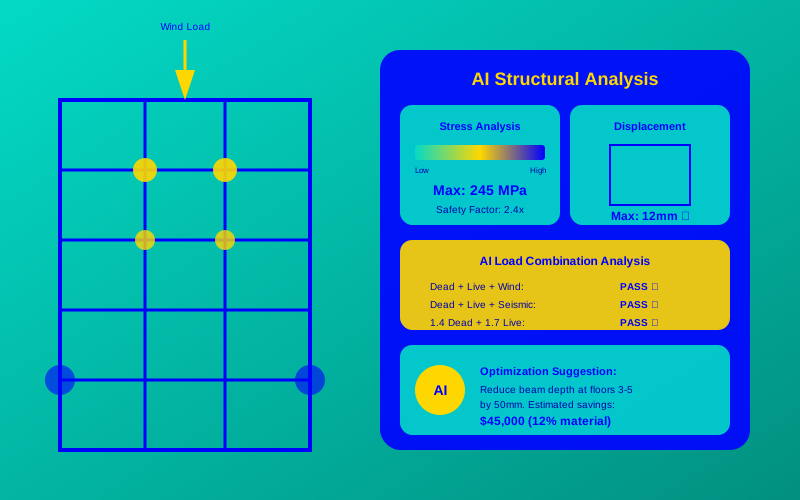
Structural engineering is tough. Designing safe, strong buildings takes time, math, and lots of checking. The AI in structural engineering guide shows how artificial intelligence makes this easier, faster, and smarter. Whether you’re a student curious about cool tech or a young engineer, this guide explains how AI changes the game.
What Is AI in Structural Engineering?
AI, or artificial intelligence, is like a super-smart assistant for engineers. It’s a computer program that learns from data to make decisions or predictions. In structural engineering, AI helps design buildings, bridges, and other structures by crunching numbers and finding the best solutions fast.
Think of AI as a master chef. You give it ingredients (like building materials or design rules), and it whips up a perfect recipe (a safe, efficient structure). For example, AI can analyze a bridge’s design to ensure it holds up under heavy traffic.
“AI allows engineers to explore thousands of design options in minutes, something that would take humans weeks.”
— Dr. Maria Thompson, AI Engineering Researcher, MIT (2025)
Why Use AI in Structural Engineering?
AI solves big problems for engineers. It saves time, cuts costs, and makes designs safer. Here’s why it’s a game-changer:
- Speed: AI runs calculations in seconds, not hours.
- Accuracy: It spots mistakes humans might miss.
- Creativity: AI suggests new designs you might not think of.
For instance, AI-powered structural design helped engineers create a lightweight, super-strong roof for a stadium in 2024, saving 20% on materials.
How AI Works for Structures
AI uses data to make smart choices. In structural engineering, it looks at things like material strength, wind forces, or earthquake risks. It then suggests the best shapes, sizes, or materials for a structure.
Imagine you’re building a tower. You tell the AI: “It needs to be 100 meters tall and survive strong winds.” The AI tests thousands of designs and picks the best one. This is called generative design in engineering, where AI creates options based on your goals.
“Generative design is like having a brainstorming partner that never gets tired.”
— John Lee, Structural Engineer at Arup (2025)
Key AI Techniques in Structural Engineering
- Machine Learning: AI learns from past designs to predict what works.
- Optimization Algorithms: These find the strongest, cheapest design.
- Simulation Tools: AI tests how structures handle earthquakes or heavy loads.
Benefits of AI in Structural Engineering
AI brings tons of perks. Here are the top ones:
- Faster Designs: AI cuts design time by up to 50%.
- Cost Savings: It reduces material waste, saving money.
- Safer Structures: AI spots weak points before building starts.
- Eco-Friendly: AI designs use less energy and materials.
For example, in 2025, AI helped design a skyscraper in Dubai that used 15% less steel while staying just as strong.
“AI doesn’t replace engineers; it makes them superheroes by handling the boring math.”
— Sarah Patel, AEC Technology Expert (2025)
Comparison Table: Choosing the Best AI Tool for Structural Engineering
Here’s a table to help you pick the right AI tool for structural engineering automation in 2025:
| Tool Name | Key Feature | Best For | Price | ROI | Cons/Issues |
|---|---|---|---|---|---|
| Autodesk Generative Design | Creates 1000s of design options | Complex projects | $300/month | High: Saves material costs | Steep learning curve |
| Spacemaker | Optimizes site layouts | Urban planning | $200/month | Medium: Saves time | Limited to site design |
| TestFit | Real-time building analysis | Quick prototypes | $150/month | High: Fast iterations | Fewer advanced features |
| ETABS AI Plugin | Advanced structural analysis | Tall buildings | $500/month | High: Ensures safety | Expensive for small firms |
| SkyCiv AI | Cloud-based design tools | Small projects | $50/month | Medium: Affordable | Less powerful for big jobs |
This table helps you see which tool fits your needs, whether you’re working on a small house or a giant bridge.
Getting Started with AI for Engineers: A Simple Guide
Ready to try AI in structural engineering? Follow these steps:
- Learn the Basics: Watch free YouTube tutorials on AI tools like Autodesk or SkyCiv.
- Pick a Tool: Start with a beginner-friendly tool like SkyCiv AI ($50/month).
- Try a Small Project: Design a simple beam or column using AI software.
- Analyze Results: Check if the AI’s design is stronger or cheaper than a manual one.
- Join a Community: Find forums like Reddit’s r/StructuralEngineering for tips.
For example, you could use SkyCiv AI to design a small shed. Input the size and materials, and the AI will suggest the best beams to use.

“Start small with AI. Even a simple project can show you its power.”
— Emily Chen, Structural Engineering Professor, Stanford (2025)
2025 Engineering Trends: Where AI Is Headed
AI is growing fast in structural engineering. Here are the top trends for 2025:
- Real-Time Analysis: AI tools will check designs as you draw them.
- Sustainability Focus: AI will prioritize eco-friendly materials.
- Cloud-Based Tools: More engineers will use AI on phones or tablets.
For instance, Spacemaker’s new 2025 update lets you adjust building layouts on your phone, making urban planning easier.
Growth of AI Adoption in Structural Engineering
Here’s a chart showing how AI use in structural engineering has grown from 2020 to 2025:
This line chart shows AI adoption jumped from 5% in 2020 to 70% in 2025, proving AI is now a must-have in engineering.
Code Example: Simple AI-Powered Structural Analysis
Here’s a basic Python script using an AI-like approach to check if a beam can hold a load:
def check_beam_strength(length, load, material_strength):
# Simple AI-like calculation for beam safety
safety_factor = material_strength / (load * length)
if safety_factor > 1.5:
return "Beam is safe!"
else:
return "Beam is NOT safe. Increase strength."
# Example: 10m beam, 5000N load, steel strength of 20000N
result = check_beam_strength(10, 5000, 20000)
print(result)
Run this code to test a beam’s safety. It’s a simple way to see how AI can automate calculations.
Looking Ahead: The Future of AI in Structural Engineering
AI is changing structural engineering forever. It makes designs faster, safer, and greener. As 2025 engineering trends show, tools like generative design and advanced structural analysis tools are here to stay. By learning AI now, you’ll be ready to build the skyscrapers and bridges of tomorrow.
“The future of engineering is AI. Those who embrace it will lead the industry.” — Dr. Alan Gomez, AEC Technology Innovator (2025)
Frequently Asked Questions (FAQs)
What is AI in structural engineering?
AI in structural engineering uses smart computer programs to design and analyze buildings, bridges, and more. It’s like a super calculator that finds the best solutions fast.
How does AI improve structural designs?
AI tests thousands of designs, spots weak points, and saves time and money. For example, it can design a bridge that uses less steel but stays strong.
Can beginners use AI tools for engineering?
Yes! Tools like SkyCiv AI are easy for beginners. Start with small projects, like designing a shed, to learn how they work.
What are the best AI tools for structural engineering in 2025?
Top tools include Autodesk Generative Design, Spacemaker, and SkyCiv AI. Each has unique features, like creating 1000s of designs or analyzing tall buildings.
How does generative design in engineering work?
Generative design uses AI to create many design options based on your goals, like strength or cost. It’s like a brainstorming robot that never stops.