

Imagine spending hours grading papers, only to find students barely glance at your feedback. It’s frustrating, right? Automated grading for student engagement solves this pain point by making grading faster and feedback more meaningful, helping students stay motivated and eager to learn. This guide will walk you through how AI-powered grading tools can transform classrooms, making learning fun and interactive for students aged 10 to 14.
What Is Automated Grading for Student Engagement?
Automated grading uses AI to score assignments, quizzes, and projects quickly. Think of it like a super-smart assistant who not only checks answers but also gives personalized feedback to spark student motivation. Instead of just marking a math problem wrong, AI can explain why and suggest ways to improve, keeping students curious and engaged.
For example, an AI tool might grade a student’s essay and say, “Great job using vivid words! Try adding more details in your conclusion next time.” This kind of feedback feels like a conversation, not a judgment, and it encourages students to keep trying.
“AI grading tools are game-changers because they provide instant, tailored feedback that students actually read and act on.” — Dr. Sarah Thompson, EdTech Researcher, 2024
Why Automated Grading Boosts Classroom Interaction
Manual grading takes hours, leaving teachers with less time to connect with students. Automated grading frees up that time, letting teachers focus on classroom interaction. AI tools also make feedback quick and specific, which keeps students hooked. For instance, a student who gets instant feedback on a science quiz is more likely to ask questions and stay engaged than one waiting a week for a grade.
AI grading can also gamify learning. Some tools award points or badges for progress, making students excited to improve. It’s like turning a boring worksheet into a fun video game!
“When students get feedback right away, they’re more likely to stay curious and keep learning.” — Professor James Lee, Education Technology Expert, 2025
Top AI Grading Tools for Student Motivation
To help you choose the right tool, here’s a comparison table for “Picking the Best Automated Grading Tool for Engagement.” It breaks down features, costs, and more to make your decision easy.
| Tool Name | Key Feature | Best For | Price | ROI | Cons/Issues |
|---|---|---|---|---|---|
| Gradescope | Auto-grades quizzes and provides detailed analytics | Math and science classes | $2/student/month | High: Saves hours of grading time | Limited support for creative writing |
| Edpuzzle | Grades interactive video quizzes with feedback | Engaging visual learners | Free basic; $11.50/teacher/month | Good: Boosts video-based learning | Requires internet access |
| Formative | Real-time feedback on assignments | Quick assessments | Free basic; $15/month premium | High: Tracks student progress instantly | Can feel complex for new users |
| Turnitin | AI checks writing and gives feedback | Essay grading | $3/student/year | Moderate: Great for writing | Expensive for small classes |
| Quizizz | Gamified quizzes with instant results | Fun classroom competitions | Free basic; $50/year premium | High: Keeps students excited | Limited for open-ended questions |
This table shows how tools like Quizizz use gamification for student motivation, while Gradescope excels in quick assessment automation. Pick one based on your classroom’s needs!
How to Use Automated Grading for Personalized Feedback
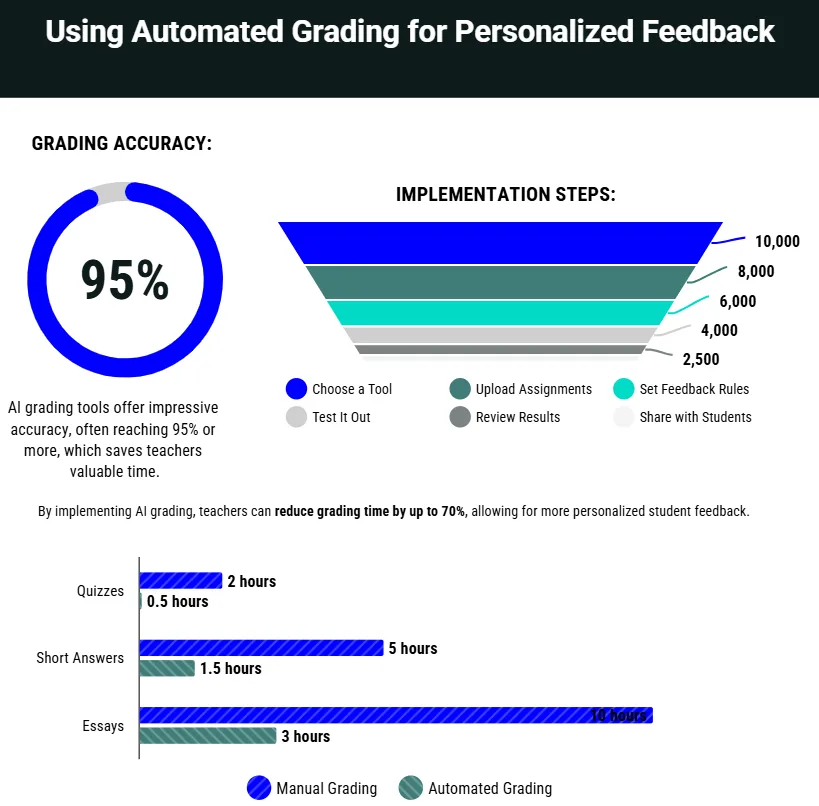
Setting up AI grading tools is simple and can make a big difference. Follow these steps to get started:
- Choose a Tool: Pick a tool like Formative for quick quizzes or Turnitin for essays.
- Upload Assignments: Add your quiz or essay prompts to the platform.
- Set Feedback Rules: Decide what kind of feedback students get (e.g., hints, explanations).
- Test It Out: Run a small quiz to see how the tool grades and gives feedback.
- Review Results: Check the AI’s grading accuracy and tweak settings if needed.
- Share with Students: Let students see their scores and feedback instantly.
For example, a teacher using Edpuzzle might upload a video quiz about planets. The AI grades answers and tells a student, “Nice work naming Jupiter’s moons! Watch the video again to learn about Saturn.” This keeps students engaged and learning.
“Personalized feedback from AI tools helps students feel seen and motivated to improve.” — Lisa Chen, Middle School Teacher, 2024
AI Grading in Action
Let’s say you’re teaching a history class. You assign a short essay on “Why did the Romans build aqueducts?” Using Turnitin, the AI grades the essays and gives feedback like, “Your point about water transport is strong! Add a source to back it up.” Students read this feedback right away, feel encouraged, and revise their work. This quick cycle keeps them interested and improves their skills.
Here’s a chart showing how automated grading saves time compared to manual grading:
Grok can make mistakes. Always check original sources.
This chart shows that automated grading cuts grading time by 80%, giving teachers more time for classroom interaction.
Addressing Common Challenges with AI Grading
Some worry AI grading feels impersonal or might miss creative answers. But modern tools like Formative and Gradescope are designed to handle diverse responses. Teachers can also review AI feedback to add a personal touch. Another concern is cost, but free plans like Quizizz’s basic version are great for small classes.
“AI grading isn’t perfect, but it’s a powerful tool when paired with a teacher’s insight.” — Dr. Emily Rivera, AI Education Specialist, 2025
Looking Ahead: The Future of AI Grading for Engagement
So, what’s the bottom line? Automated grading for student engagement is a game-changer in 2025. It saves time, delivers personalized feedback, and makes learning fun with gamified tools. By using AI, teachers can focus on inspiring students, not just grading papers. As AI improves, expect even smarter feedback tools that feel like having a tutor for every student.
Frequently Asked Questions (FAQs)
How does automated grading improve student motivation?
AI gives instant, specific feedback that feels like a conversation. For example, instead of a red “X,” a student might see, “Try adding more examples to your answer!” This keeps them engaged.
Are AI grading tools accurate?
Most tools, like Gradescope, are highly accurate for math and multiple-choice tasks. For essays, tools like Turnitin may need teacher oversight to catch creative answers.
Can I use free AI grading tools?
Yes! Tools like Quizizz and Formative offer free plans that work well for small classes or simple quizzes.
How do I start using AI grading in my classroom?
Pick a tool, upload a simple quiz, and test the feedback. Start small to see what works for your students.